NOTE, read the entire text before you begin.
Currently, it is not possible to upload files/documents on W4. The alternative is to create links to the files, and then add the links to the web pages. To create a link to a file, you can use the IT department’s service filer.uib.no.
To create a link to a file via filer.uib.no you need to use two “systems”:
- UiB’s folder system (also called File Explorer)
- A web browser (e.g. Chrome or Edge)
Then you need to perform two operations:
- Upload your file into a folder in File Explorer
- Retrieve the file’s link from the web version of File Explorer (in a web browser)
Before you begin:
- Check whether your unit has a folder in the file system, see the list of Subdirectories here:
How to use filer.uib.no – UiBhjelp’s open knowledge card - If your unit is missing a folder/subdirectory in the file system, IT can create one for you. Request this via UiBhjelp.
- Make sure you yourself have access to the file system filer.uib.no. If you don’t have access, you must apply for it via UiBhjelp — see how under the heading Access:
How to use filer.uib.no – UiBhjelp’s open knowledge card
Here’s how to do it:
Step 1. Go to UiB’s folder system (File Explorer)
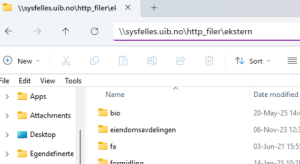
This area in File Explorer is used for uploading files for the web: \\sysfelles.uib.no\http_filer\ekstern
- Enter \\sysfelles.uib.no\http_filer\ekstern into the file system’s address bar (see the image below):
- Find your unit’s folder in the list.
- Upload the relevant file into your unit’s folder.
Step 2. Go to a web browser
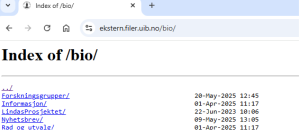
- In the web browser, enter the link to the web version of File Explorer: https://ekstern.filer.uib.no/folder name/
Note: In the last part, enter the name of your unit’s folder, like bio here: https://ekstern.filer.uib.no/bio/ - The folders in the file system and in the web version mirror each other, and the file names are the same. Click on the relevant file in the web version of File Explorer, and copy the link that appears in the browser. Then add the link to the web page.
You can find more information on UiBhjelp:
How to use filer.uib.no – UiBhjelp’s open knowledge card